
Last Updated: August 28, 2026
A peptide calculator tool is a specialized application that converts peptide research measurements into precise syringe draw volumes. You input your vial amount, bacteriostatic water volume, and target dose, and the tool instantly calculates exactly how many milliliters or insulin syringe units you need to draw for accurate dosing.
The core function is critical: peptide research requires exact measurements. A peptide calculator eliminates guesswork by automating the math that would otherwise require manual calculation. Most peptide calculators also provide visual syringe representations, showing exactly where to draw on your insulin syringe, preventing misreading of graduations, one of the most common errors in peptide preparation (peer-reviewed research).
At Canada BioGenix, we recognize that precision in peptide research depends on accurate dosing from the moment you reconstitute your vial. A reliable calculator removes human arithmetic errors so you can focus on consistent, reproducible research protocols.
Before using any peptide calculator tool, you need two foundational pieces of information: your vial size and the concentration of your reconstituted solution.
Vial size refers to the amount of peptide powder in your vial, typically measured in milligrams. Common research vial sizes include 5 mg, 10 mg, and 15 mg. This is your starting material before reconstitution.
Concentration is what you create when you add bacteriostatic water to your peptide powder. If you add 1 milliliter of bacteriostatic water to a 10 mg vial, your concentration is 10 mg per milliliter. If you add 2 milliliters to that same vial, your concentration drops to 5 mg per milliliter. The same vial size can yield different concentrations depending on how much liquid you add.
This relationship is critical because your peptide calculator tool needs both values to work. Without knowing your vial size and how much bacteriostatic water you’ve added, the calculator cannot determine your solution’s concentration and therefore cannot calculate your draw volume.
Many researchers mistakenly think vial size and concentration are interchangeable. They’re not. A 10 mg vial is a starting amount, not a concentration. The concentration only exists after you add bacteriostatic water and reconstitute.
When preparing to use a peptide calculator tool, gather the exact vial amount in milligrams and the exact volume of bacteriostatic water you’ve used. Write these down to prevent input errors and ensure accurate results.
Using a peptide calculator tool follows a consistent four-step process, regardless of which calculator you choose.
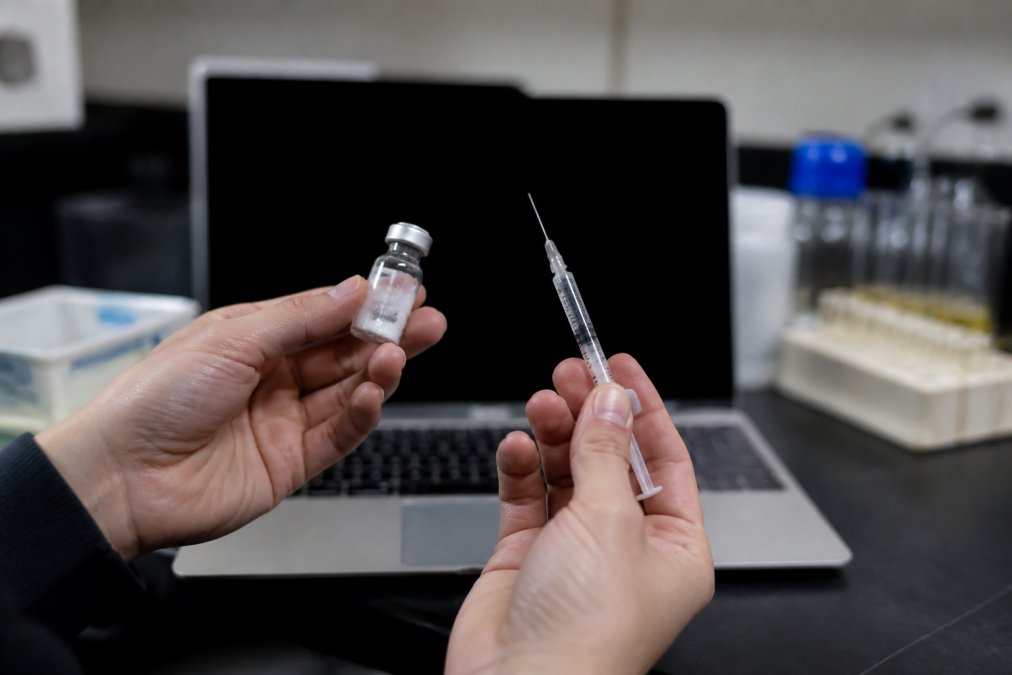
Before opening any calculator, collect three pieces of information: the vial amount in milligrams, the volume of bacteriostatic water you added in milliliters, and your target dose.
Check your vial label for the peptide amount. Next, confirm the exact volume of bacteriostatic water you’ve added. If you’re uncertain, measure again with a fresh syringe to ensure accuracy. Finally, decide on your target dose before entering data into the calculator.
Open your peptide calculator tool and locate the input fields for vial amount and bacteriostatic water volume. Enter your vial amount exactly as it appears on your label. If your vial contains 10 mg, enter "10" without units unless the calculator requests them.
Next, enter your bacteriostatic water volume. Double-check both entries before proceeding. A single digit error cascades through all subsequent calculations.
Your target dose is the amount of peptide you want per injection. When you enter your target dose, pay attention to the unit the calculator expects. Some calculators ask for micrograms (mcg), others for milligrams (mg). These differ by a factor of 1,000, so using the wrong unit produces completely incorrect results.
If your protocol calls for a 250 mcg dose and the calculator field expects milligrams, enter "0.25" not "250". Most peptide calculator tools display the unit requirement clearly next to the input field.
The final step is selecting your syringe type. Most peptide research uses U-100 insulin syringes, where 100 units equals 1 milliliter. Select the syringe format that matches your actual syringe.
The calculator will display your result in both syringe units and milliliters. Many calculators also display this visually on a syringe graphic, showing the line where you should draw. Write down this result before you begin reconstitution or dosing.
Understanding the math behind your peptide calculator tool helps you verify results and troubleshoot if something seems off.
The fundamental equation is: Concentration = Total Peptide Amount ÷ Total Liquid Volume
If you have a 10 mg vial and add 1 mL of bacteriostatic water, your concentration is 10 mg ÷ 1 mL = 10 mg/mL. If you add 2 mL to that same vial, your concentration becomes 10 mg ÷ 2 mL = 5 mg/mL.
Once you know your concentration, calculating the draw volume requires: Draw Volume = Target Dose ÷ Concentration
If your concentration is 10 mg/mL and your target dose is 250 mcg (0.25 mg), then your draw volume is 0.25 mg ÷ 10 mg/mL = 0.025 mL. On a U-100 insulin syringe, 0.025 mL equals 2.5 units.
A common source of confusion arises when converting between milligrams and micrograms. Remember: 1 mg = 1,000 mcg. Ensure you’re using consistent units throughout the calculation.
If your result seems wrong, the issue is almost always an input error, a unit mismatch, a typo, or misreading your vial label.
The U-100 insulin syringe is the standard for peptide research, but its graduations can be confusing if you’re unfamiliar with the system.
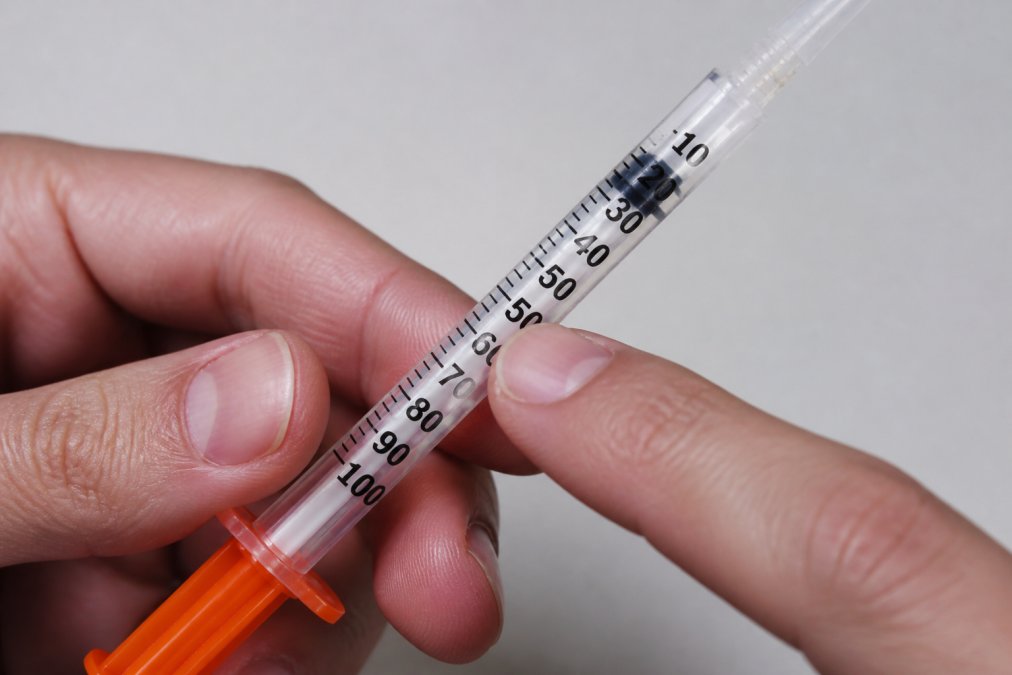
U-100 means 100 units equals 1 milliliter. On a typical U-100 syringe, the barrel is marked with lines representing 5-unit increments: 5, 10, 15, 20, 25, 30, and so on, up to 100 units. The small lines between these major markings represent 1-unit increments.
Each major marking represents a tenth of a milliliter. The 50-unit mark is halfway up the syringe, representing 0.5 mL. The 100-unit mark at the top represents 1 mL.
When your peptide calculator tool tells you to draw 2.5 units, you’re drawing 0.025 milliliters. On the syringe, this is a very small amount, just slightly above the plunger’s starting position. Precision matters here, and the finest graduations on your syringe are essential for accuracy.
The most common error when reading insulin syringe units is confusing major and minor graduations. Always count the major markings carefully and verify your draw against the calculator result before injecting.
Most errors in peptide research stem from a handful of preventable mistakes.
Input unit mismatches rank as the most frequent error. If the calculator asks for your target dose in micrograms and you enter it in milligrams, your draw volume will be off by a factor of 1,000. Always read the unit label next to every input field.
Rounding errors occur when researchers manually calculate draw volumes and round to convenient numbers. Use the exact value the calculator provides.
Misreading vial labels happens more often than expected. Always read your vial label twice before entering the amount into your calculator.
Incorrect bacteriostatic water volume is another common source of error. Measure bacteriostatic water carefully using a fresh syringe each time, rather than estimating.
Failing to account for dead space in syringes is a subtle issue. The needle and hub contain a small amount of liquid that doesn’t get injected. For most research purposes this is negligible, but be aware your actual administered dose may be slightly less than calculated.
Mixing up concentration and vial size leads to incorrect calculations. Your vial size is the starting peptide amount. Your concentration is what you create after adding bacteriostatic water.
Not documenting your reconstitution means you can’t verify your calculations later. Write down your vial size, bacteriostatic water volume, and the date of reconstitution.
Even with a reliable peptide calculator tool, verification is good practice. Manual verification catches input errors and builds confidence in your dosing protocol.
To verify, work backwards from your calculator result. If the calculator says you need to draw 10 units for your target dose, verify this using the math covered earlier.
Start with your concentration. If you added 1 mL of bacteriostatic water to a 10 mg vial, your concentration is 10 mg/mL. Convert this to mcg/mL by multiplying by 1,000: 10,000 mcg/mL.
Now, if your target dose is 250 mcg, divide: 250 mcg ÷ 10,000 mcg/mL = 0.025 mL. Convert to units: 0.025 mL × 100 units/mL = 2.5 units, not 10 units.
If your manual calculation doesn’t match the calculator result, check your inputs first: vial size, bacteriostatic water volume, and target dose. Verify you’re using consistent units throughout. If the inputs are correct and results still don’t match, try a different calculator tool.
| Verification Step | What to Check | Common Error |
|---|---|---|
| Vial amount | Does it match your label exactly? | Misreading 10 mg as 1 mg |
| Bacteriostatic water volume | Did you measure it accurately? | Estimating instead of measuring |
| Target dose units | Are you using mcg or mg? | Confusing milligrams and micrograms |
| Concentration math | Vial ÷ Water = Concentration | Dividing in the wrong direction |
| Draw volume math | Dose ÷ Concentration = Draw | Using wrong units in the equation |
Using a peptide calculator tool transforms a potentially error-prone manual process into a reliable, repeatable workflow. The tool is only as accurate as the information you provide, which is why understanding vial size, concentration, and syringe units matters. When you combine a quality calculator with careful input verification and an understanding of the underlying math, you achieve the precision that research requires. Canada BioGenix supports your research with premium-quality peptides and reliable reconstitution products, giving you a dependable foundation for accurate dosing. Visit Canada BioGenix today to explore our full range of research compounds and discover how our commitment to quality and purity can enhance your research protocols.
A: Yes, many peptide calculator tools are completely free. Some offer premium mobile apps with additional features like dose logging and protocol storage, but the core calculator functionality is often free to access online.
A: The most frequent errors include entering the wrong vial amount (confusing milligrams with micrograms), using incorrect bacteriostatic water volumes, and misreading syringe unit markings. Many researchers also fail to double-check their calculator results manually or forget to account for the concentration after reconstitution. Always verify that your inputs match your actual vial label and reconstitution plan before drawing any dose.
A: Most peptide calculators automate this, but the math is straightforward: divide your total desired concentration by your peptide amount. For example, reconstituting 10 milligrams with 1 millilitre of bacteriostatic water creates a 10 mg/mL solution. Your peptide calculator will show you exactly how many millilitres or syringe units to draw for any target dose. Always use sterile bacteriostatic water from a trusted source to maintain solution stability.
A: One milligram equals 1,000 micrograms. Peptide vials are typically labeled in milligrams (5 mg, 10 mg, 15 mg), while individual doses are often measured in micrograms. Your calculator handles this conversion automatically, but understanding the relationship prevents costly errors. Always confirm whether your vial label and your target dose are in the same unit before entering them into the calculator.
This article was written using GrandRanker